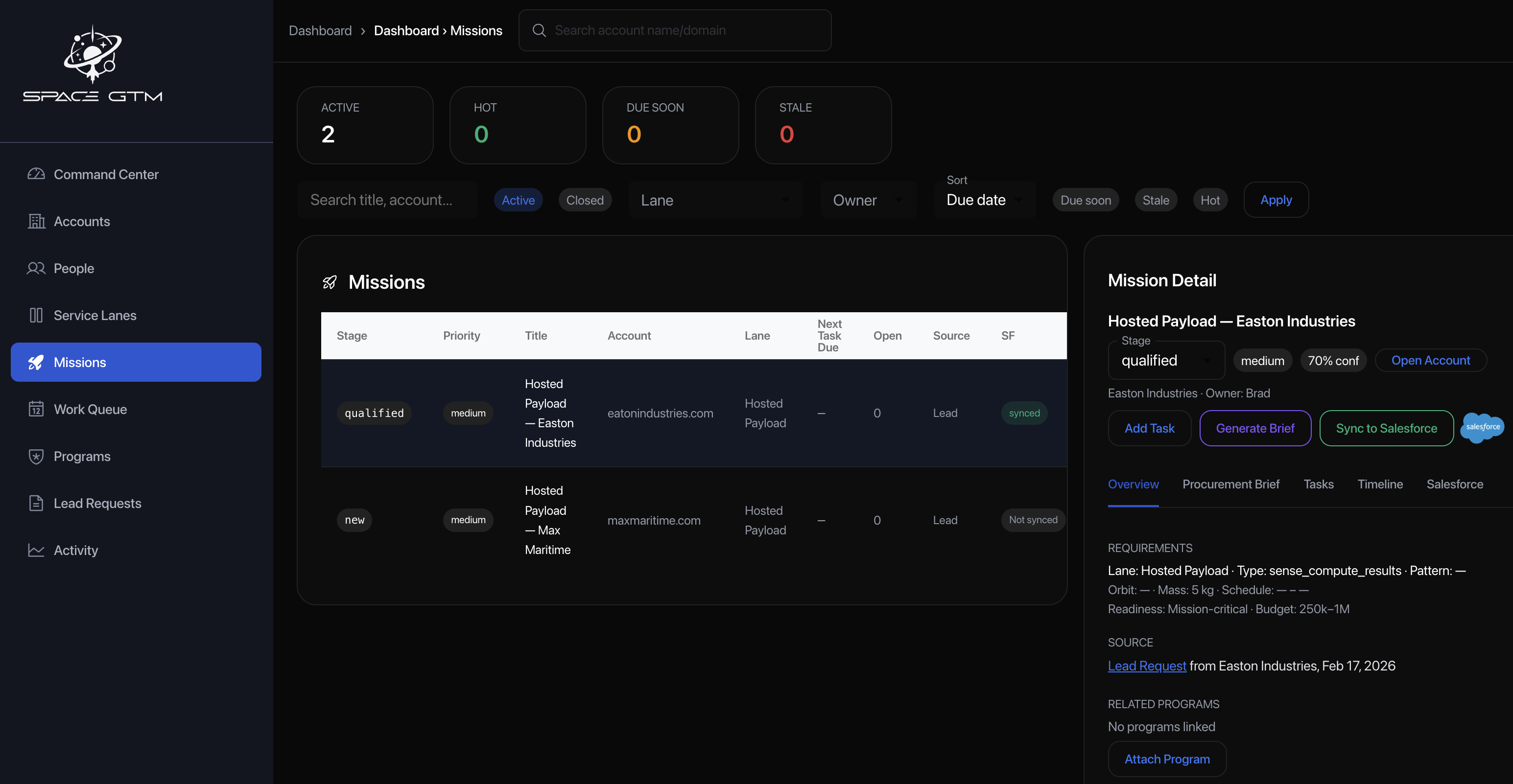
Purpose-Built ABM for Space Services

Unlike 6sense or Demandbase—which are built to be generic "intent + ads + orchestration" layers—SpaceABM is designed around the actual unit of work in space: a mission-driven procurement request. You can bolt custom fields and segments onto a horizontal ABM tool, but you still end up forcing space-specific reality (interfaces, orbit regimes, lead times, compliance gates, capacity windows, multi-leg service chains) through a marketing-shaped funnel.

SpaceABM starts where those platforms stop: it turns first-party behavior into service-lane intent and constraints, generates procurement-ready briefs, and orchestrates the next steps all the way to quotes, scheduling, and routing to fulfillable capacity—with explainable "why this is hot" logic instead of a black-box score.

The result is less vendor glue code, less brittle customization, and a system that's optimized for closing space services deals, not just running campaigns.

Full Orbit ABM — How It Works (Internal)

This document explains how the Full Orbit ABM system works end-to-end, based on what we've implemented in space-api. It covers:

  • The core ABM concepts (Accounts, Contacts, Lead Requests, Signals)
  • The "Request a Reservation" modal ingestion pipeline
  • Lead scoring (exact rules)
  • Intent signals and account rollups
  • Phase 2 (6sense-lite): decayed scoring, surge detection, registry-driven architecture
  • PostHog aggregation + daily batch job
  • Three dashboards (Hot Accounts, Service Lane Intent, People Inside Accounts)
  • AI Account Summary (cached)
  • Routing/workflow state
  • The API surface we've added

Overview

Full Orbit ABM is built around a simple idea:

  1. Prospects generate intent by interacting with Full Orbit pages and, most importantly, by submitting a Request a Reservation lead form.
  2. The backend stores each submission as a Lead Request (a canonical, auditable "sales artifact").
  3. The backend upserts the associated Prospect Company (account) and Contact (lead/person).
  4. The backend writes Intent Signals (a time-series explanation of "why this account is hot").
  5. The backend computes and maintains:
    • a Lead Score (per Lead Request)
    • an Intent Score (rolling 30-day account score, with Phase 2 decay + normalization)

The ABM dashboard (internal) uses these entities to show:

  • Top Accounts (highest intent)
  • Hot Leads (highest-scoring recent requests)
  • Service Lane Intent (which service areas are trending)
  • Phase 2: Hot Accounts, Service Lane Intent, and People Inside Accounts dashboards, plus AI-generated account summaries

Service Lane (Definition)

A Service Lane is a category of service interest that Full Orbit offers. It answers: "What kind of service is this account or lead interested in?"

Sources of lane assignment:

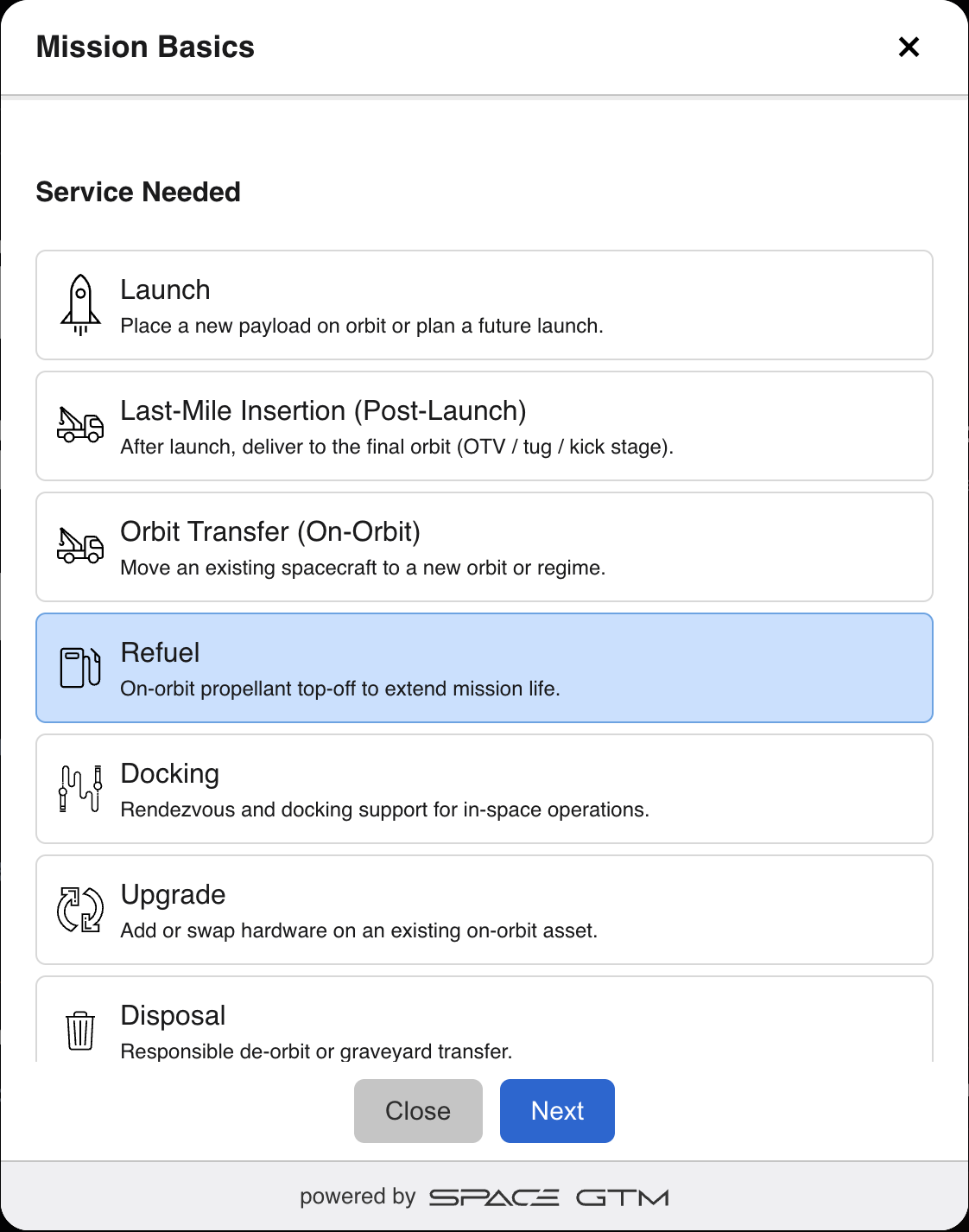
  1. Lead Request (explicit) — When someone submits the "Request a Reservation" widget, they select a service (e.g. Launch, Refuel, Disposal). That service_needed value is the lane.
  2. Page-view inference (event rules) — When we observe page views (e.g. via PostHog), we apply event rules to map URL paths to lanes. Example: /services/relocation → Orbit Transfer, /news/deorbit-as-a-service → Disposal.

Current lanes (aligned with the widget "Service Needed" list):

  • Launch
  • Last-Mile Insertion (Post-Launch)
  • Orbit Transfer (On-Orbit)
  • Refuel
  • Docking
  • Upgrade
  • Disposal
  • Other (fallback for content that doesn't match a specific service)

Where lanes appear:

  • DailyAccountIntent.top_lane — primary lane for that account (highest 7d activity)
  • DailyAccountIntent.lane_scores_7d_json, lane_scores_30d_json — score breakdown by lane
  • LeadRequest.service_needed — explicit lane from the widget
  • Service Lanes dashboard — accounts grouped by lane, with hot/surging counts

Canonical Domain Normalization (Account Key)

Account Key = normalized domain (lowercase, strip protocol/path, strip www.).

Rules:

  • Source preference: (1) domain from organization_website, (2) fallback: email domain from work_email
  • Personal email domains (gmail.com, yahoo.com, outlook.com, hotmail.com, etc.) must not be used to group to an account
  • If domain is personal → account_key = null (we still store the Lead Request, but do not create a Prospect Company)

Shared helper: utils/domain.js

  • normalizeDomainFromUrl(url)
  • normalizeDomainFromEmail(email) — returns null for personal domains
  • resolveAccountKey(payload) — prefers org website, then work email (null if personal)

Examples:

  • https://www.AcmeSpace.com/pathacmespace.com
  • name@gmail.comnull

Data Model (People + ABM)

1) Prospect Companies (ABM Accounts)

A Prospect Company represents an organization we are selling to.

Key properties:

  • domain (unique): primary identifier for the account
  • name
  • stage (ex: new, engaged, opportunity, customer)
  • intent_score (integer): rollup score (0–100 in Phase 2)
  • intent_last_at: last time we updated intent

Phase 2 additions:

  • intent_stage: Cold | Warm | Hot (from decayed scoring)
  • surge_level: Normal | Surging | Exploding
  • top_lane: primary service lane (e.g. Launch, Refuel, Disposal)
  • last_seen_at, score_updated_at
  • score_7d_raw, score_30d_raw (debug)
  • salesforce_account_id, salesforce_account_url, salesforce_owner_id (future sync)

2) Contacts (People at Prospect Companies)

A Contact represents an identified person associated with a Prospect Company (usually from a lead form submission).

Key properties:

  • prospect_company_id
  • email (stored per company)
  • status (ex: new, engaged, meeting_set, qualified)
  • last_seen_at
  • title (in v1 we map role from the payload into title if title is missing)

Phase 2 additions:

  • salesforce_lead_id, salesforce_contact_id (future sync)

3) Lead Requests (Canonical Submission Artifact)

A Lead Request is one completed "Request a Reservation" submission.

Key properties: (see original list in prior section)

Phase 2 additions:

  • account_key (nullable): resolved normalized domain for easier joins
  • why_hot_json (optional): top 3 "why hot" reasons
  • salesforce_lead_id, salesforce_task_id (future sync)

4) Intent Signals (The "Why It's Hot" Timeline)

An Intent Signal represents a time-series entry that increases account intent.

Signals are stored with:

  • prospect_company_id
  • signal_type (string)
  • topic (we use service_needed as the topic/service-lane axis)
  • weight (integer)
  • occurred_at (timestamp)

5) Daily Account Intent (Phase 2)

Stores daily rollups for dashboards and account detail timeline.

  • prospect_company_id, date
  • score_config_id, raw_score_7d, raw_score_prev_7d, raw_score_30d
  • intent_score (0–100), intent_stage, surge_ratio, surge_level
  • unique_people_7d, top_lane
  • lane_scores_7d_json, lane_scores_30d_json
  • key_events_7d_json, top_categories_7d_json, top_pages_7d_json

6) Account AI Summaries (Phase 2)

Caches the "premium" AI-generated account brief.

  • prospect_company_id, cache_date, top_lane
  • intent_score, surge_level
  • prompt_template_id, input_json, summary_md, model

7) Contact Identities (Phase 2)

Links contacts to external identifiers for the People dashboard.

  • contact_id, identity_type (posthog_distinct_id | email | hashed_email | crm_id)
  • identity_value (unique per type)

8) Registry Tables (Phase 2)

Configuration-driven, no hardcoding:

  • abm_event_rules: map URL patterns → lane/content_type/weight (path_prefix, contains, etc.)
  • abm_score_configs: versioned scoring models (lambda_decay, normalize_k, stage thresholds, surge thresholds)
  • abm_score_weights: event weights per config (page_view by content_type, cta_click by cta_id, form events)
  • abm_prompt_templates: prompt per lane + persona + stage for AI summaries

Ingestion: Request a Reservation → ABM System

Endpoint

  • POST /api/hooks/lead-requests

Optional auth: x-lead-request-secret header if LEAD_REQUEST_SECRET is set.

Server Processing Steps

When POST /api/hooks/lead-requests is called:

  1. Validate required fields (service_needed, organization_name, work_email, consent_contact)

  2. Resolve account key

    • Use resolveAccountKey(payload) from utils/domain.js
    • Personal domains (gmail, yahoo, etc.) → account_key = null
    • No Prospect Company is created for personal domains; Lead Request is still stored
  3. Compute Lead Score (details below)

  4. Upsert Prospect Company (only when account_key is non-null)

    • Find or create by domain (= account_key)
    • Stage bump: newengaged
  5. Upsert Contact (when company exists)

  6. Create Lead Request

    • Store account_key for easier joins
    • Full payload_json
  7. Create Intent Signals

  8. Recompute Account Intent Score (simple 30-day sum; Phase 2 batch job does decayed scoring separately)


Lead Scoring (Exact Logic)

Stored in lead_requests.lead_score. (See original weights: Consent, Budget Band, Funding, Urgency, Readiness, Integration, Mission Type, Completeness.)


Phase 2: Decayed Intent Scoring (6sense-lite)

The daily batch job computes a more sophisticated Account Intent Score using:

Exponential Decay

  • decay(age_days) = exp(-λ × age_days) (default λ = 0.10)
  • Contribution per event: weight × decay(age_days)

Windows

  • raw_7d, raw_prev_7d, raw_30d (events in 0–7d, 7–14d, 0–30d with decay)
  • Lane-level: lane_scores_7d, lane_scores_30d

Normalization

  • intent_score = round(100 × (1 - exp(-raw_30d / k))) (default k = 80)
  • Result: 0–100 score

Stage Thresholds

  • Cold: 0..34
  • Warm: 35..69
  • Hot: 70+

Surge Classification

  • surge_ratio = (raw_7d + 5) / (raw_prev_7d + 5)
  • Normal: < 1.5
  • Surging: 1.5–2.5
  • Exploding: > 2.5

"Why Hot" Reasons

Top 3 from 7d key events, e.g. ["2× Pricing", "1× Security", "1× Form Started"]

Event Weights (Registry)

  • page_view by content_type: pricing 25, request_reservation 30, integrations 18, security 18, case_study 12, etc.
  • cta_click: request_reservation 25, contact_sales 20
  • form_started 20, form_submitted 60

PostHog Aggregation + Daily Batch Job

  • No raw PostHog events in MySQL — we aggregate only.
  • Daily batch at 2am UTC (BullMQ job)
  • Sources: PostHog API (HogQL) when configured, or intent_signals as fallback
  • For each account: compute scores, write daily_account_intent, update prospect_companies
  • Manual trigger: POST /api/abm/jobs/recompute-intent (internal auth)
  • Queue/worker: abm-intent-recompute, abmIntentWorker.js
  • Schedule: npm run schedule:abm (run once on deploy)

Env: POSTHOG_HOST, POSTHOG_API_KEY, POSTHOG_PROJECT_ID, REDIS_URL


Intent Signals (What We Write, and Why)

When a Lead Request is created, we write intent signals (lead_submitted, budget_band, schedule_urgency, readiness_confidence) as described earlier.


Account Intent Score Rollup

Simple (real-time): sum of IntentSignal.weight for last 30 days (used on lead ingestion).

Phase 2 (batch): decayed scoring with normalization, stage, surge, stored in daily_account_intent and mirrored to prospect_companies.


Routing and Workflow

  • routing_status: new | routed | contacted | closed_won | closed_lost
  • routed_to_user_id, internal_notes, tags_json, disposition_reason

ABM API Routes Implemented

Public ingestion

  • POST /api/hooks/lead-requests
  • POST /api/hooks/posthog (PostHog webhook, optional)

Internal ABM — Lead Requests

  • GET /api/abm/lead-requests (list, filter, paginate)
  • GET /api/abm/lead-requests/:id
  • PATCH /api/abm/lead-requests/:id (workflow fields)
  • POST /api/abm/lead-requests/:id/convert
  • GET /api/abm/lead-requests/summary
  • GET /api/abm/lead-requests/:id/timeline

Internal ABM — Phase 2 Dashboards

  • GET /api/abm/accounts — Hot Accounts (range, stage, lane, surge, search, page, limit)
  • GET /api/abm/accounts/:id — Account detail (snapshot, timeline, people, AI summary)
  • POST /api/abm/accounts/:id/ai-summary — Generate or return cached AI summary
  • GET /api/abm/lanes — Service Lane Intent (hot/surging/exploding counts per lane)
  • GET /api/abm/people — People Inside Accounts (account_id optional)

Internal ABM — Jobs

  • POST /api/abm/jobs/recompute-intent — Enqueue intent recompute job

Legacy (still supported)

  • GET /api/abm/companies — List prospect companies
  • GET /api/abm/companies/:id — Company detail
  • POST /api/abm/companies/:id/convert

AI Account Summary

  • Endpoint: POST /api/abm/accounts/:id/ai-summary
  • Caching: by (account_id, cache_date, top_lane)
  • Regeneration: when intent_score change ≥ 10, or surge_level changes, or ?force=true
  • Prompt: from abm_prompt_templates registry (lane + persona + stage precedence)
  • Model: AI_MODEL env (default gpt-4o-mini)

Recommended Tracking Fields (Client)

  • utm.*, tracking.session_id, tracking.client_id, tracking.posthog_distinct_id

Required Env Vars (Phase 2)

  • POSTHOG_HOST, POSTHOG_API_KEY, POSTHOG_PROJECT_ID
  • REDIS_URL (BullMQ)
  • OPENAI_API_KEY, AI_MODEL (AI summaries)
  • LEAD_REQUEST_SECRET (optional)

Glossary

  • Account Key: normalized domain used to resolve/group accounts (null for personal email domains)
  • Contact: an identified person at a Prospect Company (usually via email)
  • Content Type: category of page/event used for scoring (e.g. pricing, security, request_reservation, service_page) — from event rules or inferred
  • Daily Account Intent: daily snapshot of decayed scores, stage, surge, lanes (Phase 2)
  • Event Rule: registry config that maps URL patterns + event type → content_type and lane (path_prefix, contains, equals, path_regex)
  • Intent Score: 0–100 normalized score from decayed event weights (Phase 2) or rolling 30-day sum (legacy)
  • Intent Signal: time-series event explaining why a company is heating up
  • Intent Stage: Cold | Warm | Hot (from score thresholds)
  • Lead Request: one completed reservation/procurement submission (canonical record)
  • Lead Score: qualification score computed from a submission (per Lead Request)
  • Prompt Template: registry config for AI summaries — system/user prompt per lane + persona + intent_stage
  • Prospect Company: ABM account we are selling to (domain-deduped)
  • Recompute Job: daily batch (BullMQ) that fetches events, applies event rules, computes decayed scores, writes DailyAccountIntent
  • Registry: configuration tables (event rules, score configs, weights, prompt templates) — no hardcoding
  • Score Config: versioned scoring model (lambda_decay, normalize_k, stage/surge thresholds) — only one active at a time
  • Service Lane: category of service interest (Launch, Refuel, Disposal, etc.); from LeadRequest.service_needed or inferred from page views via event rules
  • Surge Level: Normal | Surging | Exploding (from 7d vs prev-7d ratio)
  • Top Lane: primary service lane with highest 7d activity for an account
© 2026 Space ABM
All Rights Reserved.